
Uncategorized
Professional HP Printer Repair Services in the UAE: 2026 Business Guide
Jun
Is your office’s operational flow worth more than the cost of a simple replacement part? For many UAE businesses, the true expense of a hardware failure isn’t the invoice from the technician; it’s the hours of lost productivity while a critical machine sits idle. If you’ve encountered a sudden breakdown, you’re likely weighing the frustration of slow turnaround times against the high cost of official components. Professional HP printer repair is about more than just clearing an error code. It’s about restoring a seamless workflow with the confidence that your hardware will remain dependable for the long term.
We understand that you need a partner who prioritizes uptime and transparent communication over high-pressure sales. This 2026 guide provides the clarity you need to decide whether to invest in a fix or transition to a newer model. You’ll discover how to navigate the financial framework of hardware maintenance, the importance of sourcing genuine parts, and expert strategies for extending the longevity of your office equipment. We’ve designed this overview to lead you from technical uncertainty to a point of professional resolution, ensuring your team stays focused on their core objectives rather than troubleshooting hardware.
Key Takeaways
- Identify critical hardware symptoms like fuser unit failures and ghosting images to catch mechanical issues before they cause significant office downtime.
- Apply the “50% rule” to evaluate the financial feasibility of an HP printer repair versus the long-term benefits of investing in new or refurbished hardware.
- Master preventative maintenance techniques, such as monitoring page counts and scheduling quarterly internal cleanings, to extend the operational life of your office equipment.
- Explore how specialized diagnostic audits and a robust inventory of high-quality spare parts ensure the rapid restoration of both standard and large-format printing systems.
Identifying Critical HP Printer Failures and Hardware Symptoms
While software updates often resolve minor connectivity glitches, many office disruptions stem from physical degradation that drivers cannot fix. In the UAE’s arid environment, fine dust particles frequently bypass internal filters, settling on sensitive sensors and moving parts. This buildup acts as an abrasive, grinding down plastic gears and causing the carriage to stutter during high-speed print jobs. If your documents show repetitive vertical lines or “ghosting” where a faint image appears twice on the page, you’re likely facing a fuser unit failure. These Common Laser Printer Malfunctions often require professional HP printer repair to replace the heating element or the pressure rollers that have lost their integrity.
Persistent paper jams are another sign that hardware is reaching its limit. This isn’t always about the paper quality; it’s often a symptom of roller degradation. Pickup rollers are made of specialized rubber designed to grab a single sheet. Over time, the rubber becomes smooth or “glazed,” leading to multi-page feeding errors or the machine’s inability to lift paper from the tray entirely. When these mechanical failures occur, the printer often displays cryptic error codes, such as the 50.x fuser error or 59.x motor error. Deciphering these signals early prevents a total hardware breakdown and helps maintain consistent operational uptime for your business.
Common HP LaserJet Mechanical Issues
- Worn pickup rollers: These components lose their friction over several thousand cycles, causing frequent jams at the start of the paper path.
- Toner leakage: Fine powder can escape the cartridge and coat internal laser optics, resulting in faded prints or blurred text that cleaning cycles won’t fix.
- Fuser film tearing: The delicate sleeve around the heating element can rip, which disrupts heat distribution and prevents toner from properly bonding to the paper.
Specialised Plotter and DesignJet Failures
High-end wide-format machines like the HP DesignJet series face unique hardware challenges due to their size and complexity. A snapped carriage belt is a frequent failure point, often preceded by a loud grinding noise or alignment errors. Similarly, the ink tube system can develop pressure leaks, leading to air bubbles that cause “streaky” lines in architectural renders. Specialized HP printer repair for these models also involves cleaning the encoder strip. If this thin plastic strip becomes contaminated with ink mist or dust, the printhead loses its position, resulting in jagged lines and failed prints.
The Professional HP Printer Repair and Diagnostic Process
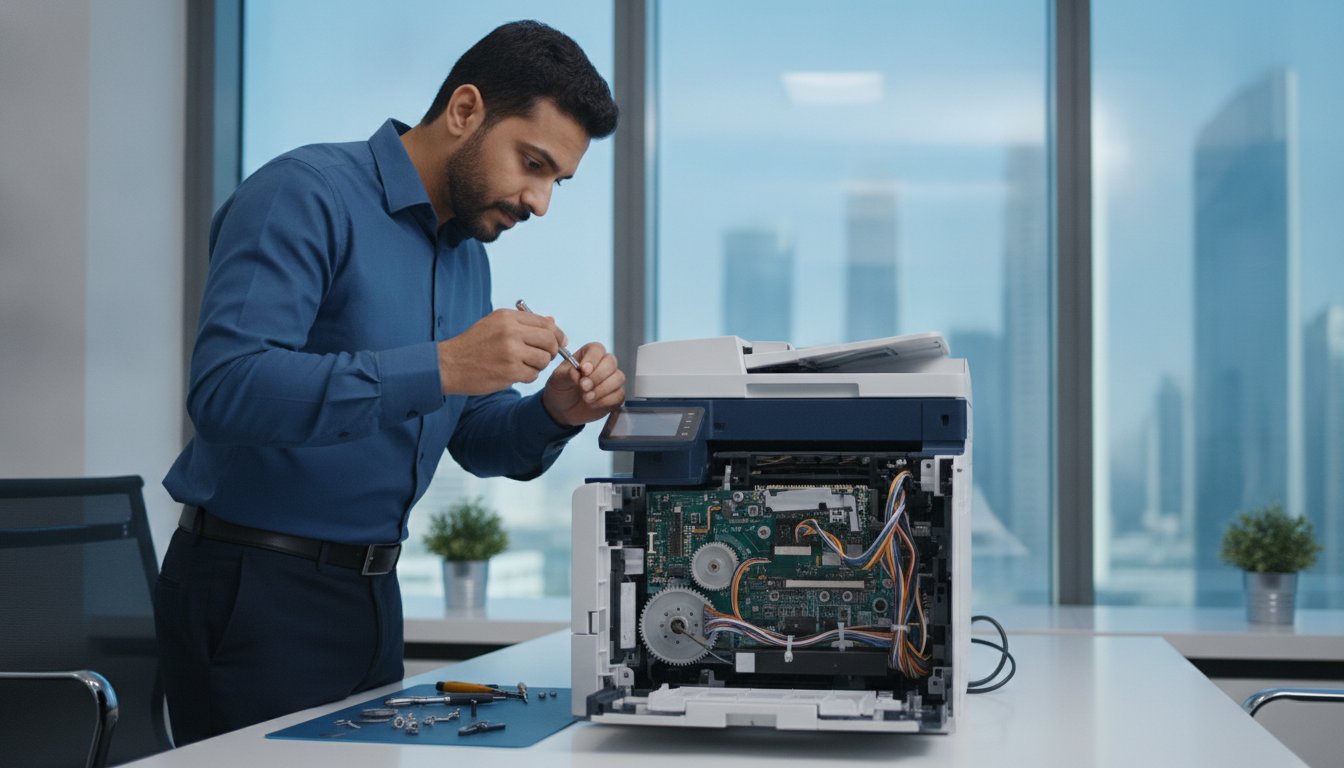
A successful restoration of office equipment requires a methodical, top-down approach that goes beyond basic troubleshooting. While automated software tools can identify surface-level errors, a professional HP printer repair involves a deep physical audit to uncover the root cause of hardware fatigue. This process ensures that the underlying mechanical issues are resolved rather than just temporarily bypassed.
The repair cycle follows a structured five-step methodology designed for maximum reliability:
- Step 1: Comprehensive hardware audit and internal cleaning. Technicians remove accumulated toner debris and fine desert dust that can cause sensor misalignment and premature component wear.
- Step 2: Component-level testing of power supplies and logic boards. We measure voltage stability to ensure the formatter board isn’t suffering from intermittent power drops that lead to system crashes.
- Step 3: Precision replacement of worn fuser assemblies or belts. For large-format DesignJet models, this includes replacing the carriage belt and checking the tensioners for optimal movement.
- Step 4: Calibration and firmware synchronisation. This step ensures that the new hardware components communicate perfectly with the printer’s internal operating system for consistent output quality.
- Step 5: Load testing under heavy office use. We run high-volume print cycles to confirm the device can handle your daily workflow without overheating or jamming.
If your equipment is showing signs of instability or persistent error codes, securing a professional diagnostic assessment is the most reliable way to prevent a total system failure and protect your hardware investment.
Advanced Hardware Diagnostics
Expert technicians utilize specialized tools to test motor torque and sensor response times. In high-cycle environments, gear assemblies often develop micro-cracks that are not visible to the naked eye. By checking these assemblies and applying high-grade lubrication, we prevent future mechanical seizures. We also perform precise voltage testing on the DC controller and formatter boards to identify degrading capacitors before they fail completely, which is a common cause of “dead” printers.
Genuine vs. OEM Spare Parts
HP Printer Repair vs. Replacement: A Financial Framework
Deciding whether to salvage a malfunctioning device or invest in a new unit is a critical fiscal decision for any office manager. It’s often tempting to view a breakdown as an excuse for an upgrade, but the most cost-effective path isn’t always the most obvious one. Professional HP printer repair often yields a significantly higher return on investment, especially when dealing with enterprise-grade hardware designed for decade-long lifespans. To make an informed choice, you must look beyond the immediate repair invoice and consider the total cost of ownership.
The industry standard for this decision is the “50% rule.” If the cost of a single repair exceeds half the price of a comparable new model, replacement usually becomes the logical choice. However, this rule requires nuance. For instance, older HP LaserJet “workhorses” often feature robust metal internal frames that outlast the lighter, plastic-heavy components found in modern entry-level machines. In these cases, spending 40% of the original value on a high-quality fuser or logic board can extend the machine’s life by several years, providing better value than a modern unit with a shorter duty cycle.
You should also account for the hidden costs associated with new hardware. A new printer isn’t just a sticker price; it involves time spent on driver deployment, network configuration, and ensuring compatibility with existing office logistics. If your current fleet uses a specific toner cartridge across ten different machines, introducing a new model creates a secondary supply chain requirement. Maintaining consistency through expert repair often saves more in administrative and procurement hours than the cost of the technical service itself.
When to Choose Professional Repair
Repair is the superior option for high-value DesignJet plotters or multi-function units where the failure is limited to a specific mechanical component. If your business relies on discontinued models that are perfectly integrated into legacy software, a repair is often the only way to avoid a cascading series of expensive software updates. Additionally, if you manage a large fleet, keeping a seasoned machine operational ensures that your supply management remains streamlined and predictable.
When Replacement Makes More Sense
Replacement is typically the correct path for entry-level InkJet models where the cost of a single printhead or ink delivery system might exceed the price of a brand-new unit. If a technician identifies irreparable damage to the main chassis or a cracked laser scanner assembly, the structural integrity of the machine is compromised. Furthermore, if your current equipment is over eight years old, the energy efficiency gains and improved security protocols of 2026 HP models may justify the capital expenditure of a full upgrade.
Preventative Maintenance to Avoid Future HP Repairs
Proactive care is the most effective strategy to minimize the need for unscheduled HP printer repair. While modern systems are engineered for high-volume output, they aren’t immune to the environmental stressors common in the UAE. Fine particulate matter can bypass standard internal filters, settling on delicate optical sensors and lubrication points. By implementing a structured maintenance schedule, you transition from a reactive “break-fix” cycle to a state of consistent operational readiness. Understanding the full scope of professional printer servicing is essential for any UAE business looking to protect its hardware investment and avoid the steep costs of emergency breakdowns.
Effective prevention involves several key technical habits:
- Quarterly internal cleaning: Removing accumulated toner dust and external debris prevents abrasive wear on plastic gears and ensures sensors remain accurate.
- Monitoring page counts: Every HP model has a rated duty cycle for its fuser and rollers. Tracking these metrics allows you to replace components proactively before they fail mid-job.
- Ensuring proper ventilation: Formatter boards and power supplies generate significant heat. Placing hardware in cramped, unventilated spaces leads to premature board failure and intermittent system crashes.
- Staff training: A high percentage of mechanical damage occurs during incorrect paper loading or aggressive jam clearance. Educating your team on the correct way to handle the paper path protects the delicate internal rollers.
The Importance of Regular Servicing
Professional printer servicing transforms hardware maintenance from an emergency expense into a predictable operational cost. During these scheduled visits, technicians can identify early warning signs of motor fatigue or belt fraying that a standard user might miss. For businesses managing high-capacity LaserJet fleets, this oversight is the primary factor in extending the machine’s functional lifespan. It’s much easier to replace a worn belt during a scheduled window than to manage a hardware crisis during a critical deadline.
Optimising Your Printing Environment
Hardware longevity is also a product of the surrounding infrastructure. Fluctuating power levels can damage sensitive logic boards, making high-quality surge protection a necessity for every office device. Additionally, the UAE’s humidity levels can impact the moisture content of paper, leading to frequent jams and poor toner adhesion. Integrating your equipment into a professional network installation allows for remote monitoring of hardware health. This connectivity enables IT managers to receive real-time alerts about mechanical warnings, ensuring that a professional HP printer repair is only ever a planned event. To secure your hardware’s future, you should book a comprehensive maintenance audit to identify and resolve potential risks before they impact your workflow.
Why UAE Businesses Trust ZD Computer Trading for HP Support
Reliability in the UAE business ecosystem is defined by a partner’s ability to maintain operational standards across diverse hardware categories. ZD Computer Trading has established itself as a seasoned local expert by offering a comprehensive suite of maintenance and procurement services. Whether your office relies on a single desktop LaserJet or a fleet of large-format HP plotters, our technical team possesses the specialized knowledge required to restore functionality swiftly. This versatility ensures that you don’t need to coordinate with multiple vendors for different hardware tiers.
A primary challenge for many UAE organizations is the slow turnaround time associated with sourcing official components. We address this pain point by maintaining a robust stock of high-quality spare parts, ranging from fuser assemblies to complex logic boards. This readiness allows for rapid restoration of services, minimizing the impact of hardware failure on your team’s output. Our national coverage ensures that onsite technical assistance is available across the Emirates, providing professional support directly at your place of business. It’s this commitment to readiness that allows us to serve as a dependable partner for consistent operational uptime.
- Broad Hardware Proficiency: Expertise across standard office printers and high-precision DesignJet plotters.
- Rapid Part Availability: On-hand inventory of critical components to bypass supply chain delays.
- Flexible Procurement: Access to refurbished sales and rental options to bridge gaps during major repairs.
- Regional Presence: Dedicated onsite support available throughout the UAE for immediate troubleshooting.
Comprehensive Office Equipment Expertise
Our commitment to office operational excellence extends beyond HP printer repair. We provide integrated solutions that simplify the management of complex IT environments. This includes seamlessly combining technical maintenance with photocopier rental to ensure your documentation workflow never pauses. Our technicians are also equipped to handle broader infrastructure needs, such as CCTV network requirements and secure networking. By managing hardware from HP, Canon, and Xerox, we act as a one-stop resource for your entire office logistics framework.
Ready to Restore Your Productivity?
When a critical printer fails, every hour of downtime translates to lost administrative momentum. We prioritize fast response times and provide transparent diagnostic reports so you can make informed decisions about your hardware. Our goal is to provide peace of mind through technical excellence and professional integrity, ensuring that your equipment serves your business goals rather than hindering them. Contact ZD Computer Trading today to secure expert HP printer repair and ensure your office remains fully operational.
Securing Long-Term Uptime for Your Office Infrastructure
ZD Computer Trading provides the comprehensive support needed to navigate these technical challenges with confidence. When you require professional HP printer repair, our team provides the technical precision and genuine parts necessary for a lasting resolution. We specialize in both LaserJet and DesignJet systems, offering national UAE technical coverage and flexible refurbished or rental options to suit your specific needs. Get Expert HP Printer Repair Support Now and take the first step toward a more dependable and efficient office workflow.
Frequently Asked Questions
How much does it typically cost to repair an HP LaserJet in the UAE?
Repair costs are determined by the specific hardware model and the extent of the component failure. While minor adjustments are more affordable, a complex HP printer repair involving fuser replacements or logic board work requires a detailed diagnostic audit to provide an accurate estimate. This approach ensures you receive transparent pricing based on the actual technical requirements of your machine rather than a generic estimate.
Can you repair HP DesignJet plotters onsite at our office?
Yes, we provide onsite technical assistance for HP DesignJet plotters throughout the UAE to minimize the risk of moving sensitive large-format equipment. Our technicians arrive with the necessary diagnostic tools and a selection of common spare parts to resolve issues directly at your facility. This service is designed to maintain your project timelines and avoid the logistical challenges of transporting wide-format hardware.
What are the most common causes of HP printer paper jams?
Paper jams are frequently caused by glazed pickup rollers that have lost their friction or the accumulation of fine dust in the paper path. Using low-quality paper or overfilling trays can also lead to multi-page feeding errors. Regular internal cleaning and replacing worn rubber components are the most effective ways to prevent these recurring disruptions in your office workflow.
Is it worth repairing an HP printer that is out of warranty?
Repairing an out-of-warranty device is often highly cost-effective for enterprise-grade LaserJet models with robust internal frames. If the repair cost is less than 50% of the price of a comparable new unit, restoring the machine is a sound financial decision. This is especially true for devices integrated into specific legacy software environments where a replacement would trigger secondary configuration costs.
How long does a professional HP printer repair usually take?
Most professional repairs are completed within 24 to 48 hours, depending on the complexity of the diagnostic findings. Because we maintain an extensive local inventory of high-quality spare parts, we can often bypass the long lead times associated with international shipping. Our goal is to restore your printing services as quickly as possible to prevent any significant loss of office productivity.
Do you provide a warranty on parts replaced during the repair?
We stand by the integrity of our work and the high-quality spare parts used during each service engagement. While specific terms may vary based on the component type, providing a warranty on replaced parts is a standard part of our commitment to professional excellence. This ensures you have peace of mind regarding the long-term reliability of your hardware after the service is complete.
Why is my HP printer showing a “Fuser Error” and can it be fixed?
A “Fuser Error” typically signals that the heating element has failed to reach the required temperature or the fuser film has torn. This is a critical failure that prevents toner from bonding to the paper, but it is a repairable issue. A technician can replace the fuser assembly to restore perfect print quality and prevent further internal damage to the printer’s chassis.
Do you offer HP printer rentals while my machine is being repaired?
Yes, we offer comprehensive printer rental services to bridge the gap while your primary machine is undergoing a major HP printer repair. This ensures that your documentation workflow remains uninterrupted even during complex component-level restorations. We provide a variety of models to match your current output requirements, maintaining your office’s operational consistency throughout the repair process.
