
Uncategorized
Professional Printer Servicing: The Complete 2026 Guide for UAE Businesses
Jun
The most expensive component of your office hardware isn’t the initial purchase price or the monthly ink replenishment; it’s the 400% surge in operational costs that occurs when a critical machine fails during a high-stakes deadline. Many UAE businesses treat printer servicing as an optional expense, only to find that frequent paper jams and poor output quality eventually compromise their professional reputation. These technical disruptions are rarely just minor inconveniences. They are often the direct result of a neglected maintenance cycle that can prematurely end the five to ten-year lifespan expected of a high-quality laser printer.
If you’ve ever felt uncertain about your hardware’s reliability or worried about the high cost of emergency repairs, you aren’t alone. We understand that consistent uptime is vital for maintaining your competitive edge in the local market. This comprehensive 2026 guide will show you how professional maintenance extends equipment life and ensures you never face a breakdown during a critical task. You’ll gain a clear understanding of modern maintenance schedules, learn how to navigate UAE e-waste regulations, and discover a structured path toward a lower total cost of ownership for your entire office fleet.
Key Takeaways
- Professional printer servicing is a strategic IT investment that prevents the significant cost spikes associated with emergency hardware failure.
- Deep-level technical maintenance involving internal cleaning and precision lubrication is essential for removing paper dust and preventing mechanical friction.
- Moving from a reactive “break-fix” model to scheduled preventative maintenance helps ensure zero downtime during critical business operations.
- Recognizing early warning signs like unusual grinding noises or persistent jams allows for technical intervention before equipment life is shortened.
- Selecting a partner with specialized expertise in brands like HP and Canon provides a reliable resource for both hardware procurement and ongoing support.
What is Professional Printer Servicing and Why Does it Matter?
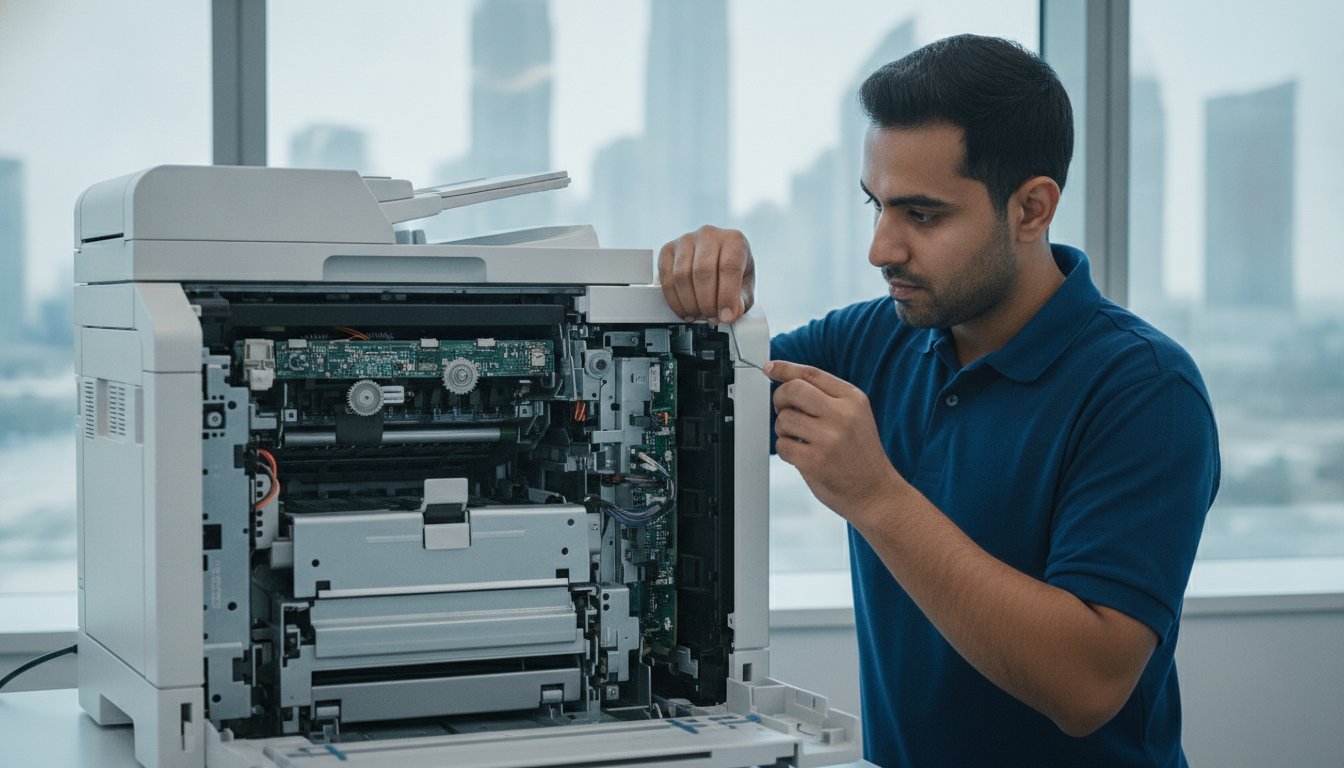
Professional printer servicing is a meticulous engineering protocol designed to maintain the complex mechanical and digital synergy within modern office hardware. While many office managers equate maintenance with simply replacing a toner cartridge or wiping the scanner glass, true technical servicing involves a multi-point inspection that reaches deep into the machine’s internal architecture. It’s the difference between surface-level aesthetics and operational integrity. For high-end equipment, this level of care is often a mandatory requirement for manufacturer warranty compliance. Skipping these scheduled visits can leave a business vulnerable to high repair costs if a major component fails prematurely.
Modern multifunction printers (MFPs) are significantly more advanced than their predecessors, requiring specialized calibration for their scanning and copying components to ensure color accuracy and alignment. Because the laser printing process involves high heat, static electricity, and precise timing, even microscopic amounts of debris can cause significant hardware degradation. Professional technicians focus on the components that users cannot safely reach, such as fuser units, transfer rollers, and internal sensors.
The Evolution of Office Printing Technology
Office printers have transitioned from simple, standalone desktop units into complex, network-integrated hubs that serve as the nerve center for document workflows. In 2026, these machines are essentially specialized computers with sophisticated moving parts. This evolution means that firmware updates are now a critical part of a standard service visit, as they patch security vulnerabilities and improve processing efficiency. In high-volume business environments across the UAE, the mechanical wear and tear on these integrated systems is constant. Without regular printer servicing, the friction of thousands of pages passing through the paper path will inevitably lead to mechanical failure.
Economic Impact of Printer Downtime
The financial consequences of a non-functional printer extend far beyond the cost of a repair technician. When a device fails, the hidden costs manifest as lost billable hours and missed project deadlines, which can stall an entire department’s productivity. Poor print quality also carries a heavy price; it directly affects your brand’s professional image during client presentations or contract signings. Additionally, a poorly maintained machine often suffers from inefficient toner distribution. Regular printer servicing ensures that every gram of toner is used effectively, reducing expensive waste and lowering the long-term total cost of ownership for your office hardware.
The Core Components of a Comprehensive Service Protocol
A standardized protocol for printer servicing is far more than a reactive response to a hardware error. It’s a proactive technical deep dive that addresses the root causes of mechanical failure before they manifest as office downtime. A professional technician begins by removing the microscopic paper dust and leaked toner that naturally accumulate inside the chassis. These particulates aren’t just messy; they create significant mechanical friction that puts undue stress on the drive motors. By systematically cleaning these internal cavities, we prevent the abrasive wear that often leads to expensive component replacements.
Precision lubrication of all moving parts follows the cleaning phase. If the gears and drive motors aren’t properly lubricated, they’ll eventually begin to grind, leading to permanent hardware damage. This stage is paired with a thorough component inspection. Technicians evaluate the health of the transfer belts and pickup rollers, looking for the tell-tale signs of glazing or cracking. This methodical approach aligns with broader Federal government print management policies that emphasize efficiency and resource conservation through meticulous asset care.
Mechanical and Optical Maintenance
The paper path is the most frequent site of technical frustration. Servicing this area involves cleaning the sensors and rollers to eliminate the root causes of chronic paper jams. We also focus on the optical system, cleaning the scanner glass and internal mirrors to ensure every digital copy is crisp and streak-free. The fuser unit is the specific component that bonds toner to paper using a combination of high heat and pressure. Because it operates at such high temperatures, it requires regular inspection to ensure the heating elements and pressure rollers haven’t degraded over time. If you notice persistent vertical lines on your documents, it’s often a sign that these optical or mechanical components require attention from an expert printer maintenance provider.
Software and Connectivity Optimization
In 2026, a printer’s digital health is just as important as its mechanical state. Technicians verify all network settings to ensure a seamless network installation for office UAE integration. This includes updating drivers and firmware to patch critical security vulnerabilities and improve overall processing speed. We also verify printer-to-cloud communication, ensuring that modern scanning workflows remain uninterrupted. If the software isn’t optimized, even a mechanically perfect machine will feel sluggish and unresponsive to the needs of a fast-paced office environment.
The final stage of the protocol involves diagnostic testing and calibration. Technicians run comprehensive system reports to identify potential failures in the electronics or power supply before they occur. We then calibrate the machine to ensure color accuracy and perfect alignment across all print jobs. This ensures that every document your business produces meets the high standards your clients expect. By the time the service visit is complete, your hardware isn’t just repaired; it’s optimized for another cycle of high-volume performance.
Preventative Maintenance vs. Reactive Repair: A Comparison
Choosing between reactive repair and preventative maintenance is a choice between managed stability and operational chaos. The “break-fix” model is inherently reactive. You only call for help once a machine has already failed. This approach often results in urgent, high-cost interventions and significant downtime that disrupts your entire workflow. On the other hand, scheduled printer servicing identifies minor issues, such as worn rollers or slightly misaligned belts, before they escalate into catastrophic failures. For businesses utilizing a refurbished photocopier UAE, this proactive care is even more critical. Regular maintenance ensures these units continue to perform at factory standards, which can help a laser printer reach its full ten-year potential rather than failing at the five-year mark.
Analyzing the Total Cost of Ownership (TCO) over a five-year period reveals that preventative care is the more economical path. While there’s a predictable cost associated with regular visits, it’s far lower than the price of replacing major assemblies like fuser units or imaging drums under emergency conditions. When you account for the loss of productivity during a breakdown, the case for a proactive schedule becomes undeniable. We find that clients who commit to a structured plan experience fewer “office emergencies” and enjoy a much higher degree of confidence in their hardware’s reliability.
The ROI of Regular Servicing
The financial benefits of maintenance become clear when you compare the cost of a standard service call against a full motherboard replacement. Emergency repairs are almost always more expensive because they often involve urgent labor rates and unplanned hardware costs. A comprehensive printer maintenance guide can help you visualize these savings by showing how preventative care keeps internal parts in peak condition. By investing in these checks, you reduce the frequency of needing a specialized HP printer repair for major breakdowns. There’s also an environmental dividend. Extending the life of your hardware reduces the amount of hazardous e-waste your company generates, aligning with the UAE’s focus on integrated waste management.
Customizing Your Maintenance Schedule
A generic schedule doesn’t suit every office fleet. You should determine your service frequency based on actual monthly print volume rather than just waiting for a quarterly date to arrive. If your team produces thousands of pages a week, your rollers and fusers will wear out much faster than those in a small office. Plotters and large-format scanners have even more specific requirements due to their precision optics and wide paper paths. Local environmental factors like ambient dust and temperature fluctuations in the UAE also impact these intervals. Machines located near high-traffic areas often require more frequent printer servicing to prevent dust from clogging sensitive internal sensors.
Warning Signs: When to Schedule Professional Intervention
Don’t ignore the subtle signals your hardware sends before a complete breakdown. While a single paper jam might be a fluke, a pattern of technical glitches usually indicates a need for professional printer servicing. These symptoms often serve as an early warning system for deeper mechanical or electrical issues that, if left unaddressed, could lead to a total system failure. Recognizing these red flags early allows you to transition from reactive panic to planned maintenance.
Watch for these specific indicators of declining hardware health:
- Persistent paper jams: If jams occur frequently despite using premium, high-quality paper stock, your pickup rollers are likely worn or misaligned.
- Unusual auditory cues: Grinding, squeaking, or clicking noises during the print cycle are clear signs of gear friction or motor strain.
- Visual output defects: Vertical lines, faded text, or “ghosting” images suggest that the internal imaging components are reaching the end of their functional life.
- Recurring error codes: If your display panel frequently shows numerical errors that require a full system restart to clear, the internal sensors are detecting a consistent fault.
- Thermal or olfactory warnings: Burning smells or excessive heat emanating from the rear of the device are critical safety risks that require an immediate power-down.
Identifying Hardware Degradation
Understanding the language of your machine helps in prioritizing technical support. For instance, HP and Canon devices utilize specific numerical sequences to communicate internal states; an HP “50.x” error typically points to a fuser assembly failure that requires expert attention. “Ghosting,” where a faint version of a previous image appears on the page, usually indicates a failing drum or transfer belt that can no longer hold a consistent electrical charge. Vertical streaks on scans often indicate a dirty or scratched scanner prism. These issues are rarely solved by software updates alone and typically require a physical inspection of the optical and mechanical assemblies. For Canon devices specifically, understanding these failure patterns is essential; a dedicated resource on Canon printer repair in the UAE provides the diagnostic depth needed to address these hardware failures cost-effectively. For a broader technical and commercial framework, the 2026 UAE printer repair and maintenance reference provides a thorough technical and commercial framework.
The Risks of DIY Servicing
It’s tempting to attempt a quick fix, but amateur interventions often lead to permanent hardware damage. Using improper cleaning agents, such as standard window cleaners, can dissolve the specialized coatings on sensitive optical sensors and mirrors. Furthermore, laser printers contain high-voltage components and fuser units that operate at temperatures high enough to cause severe burns to untrained personnel. Beyond the physical risks, amateur repairs can inadvertently void your manufacturer and service provider warranties. If your office equipment is exhibiting any of these red flags, it’s time to request a professional printer inspection before a minor glitch becomes a major capital expense.
Selecting a National Service Partner for Office Equipment
Identifying a reliable partner for printer servicing requires a thorough evaluation of technical depth and local resource availability. A business shouldn’t settle for a provider that only understands a single brand. Instead, look for a team with verified expertise across major industry leaders like HP, Canon, and Xerox. This technical versatility ensures that your entire office fleet remains operational, regardless of the various models you might have deployed across different departments. A partner who manages both hardware sales and long-term technical support offers a more cohesive service experience than a simple third-party repair shop. Businesses seeking to benchmark their service standards can consult the professional printer repair and maintenance guide for UAE businesses to understand what a high-quality service engagement should include.
Local parts availability is perhaps the most critical factor in minimizing repair turnaround times. If a fuser unit or a logic board fails in a high-volume environment, your business cannot afford to wait for international shipping cycles. A seasoned service partner maintains a robust inventory of genuine components within the UAE to ensure that on-site interventions result in immediate resolutions. This readiness protects your workflow from the cascading delays that occur when a primary document hub remains offline for several days.
Comprehensive Support Beyond the Printer
The most effective service providers understand that a printer doesn’t exist in a vacuum; it’s a node within a larger digital ecosystem. Integrating your maintenance needs with a partner who manages your broader IT infrastructure creates a more resilient office. This includes everything from laptop and desktop repair to ensuring your hardware aligns with business CCTV network requirements UAE and secure networking protocols. When your service team can handle specialized equipment like plotters and large-format scanners alongside your standard multifunction units, you reduce the administrative burden of managing multiple vendor contracts.
The ZD Computer Trading LLC Advantage
ZD Computer Trading LLC has built a reputation as a comprehensive solution provider for businesses throughout the UAE. We don’t just fix hardware; we provide a stable foundation for your daily operations through meticulous attention to detail. Our team specializes in high-stakes environments where downtime isn’t an option, offering on-site diagnostics and rapid resolution for both HP and Canon systems. This seasoned expertise allows us to identify potential failures before they disrupt your staff’s productivity.
We provide flexible options to suit various budgetary and operational needs, ranging from direct HP and Canon printer repair to versatile printer rental services. If your business is looking to scale without a heavy capital investment, our inventory of refurbished digital photocopiers offers factory-standard performance at a strategic price point. By combining technical mastery with a “can-do” professional integrity, we ensure that your office technology remains an asset rather than a source of technical frustration.
Securing Your Business Continuity with Expert Technical Care
Maintaining a reliable office infrastructure requires more than just high-quality hardware; it demands a commitment to technical excellence. By transitioning from a reactive “break-fix” model to a structured printer servicing schedule, you eliminate the hidden costs of downtime and preserve your equipment’s professional output quality. We’ve explored how identifying early warning signs and selecting a partner with deep brand-specific knowledge can drastically lower your total cost of ownership over time.
ZD Computer Trading LLC provides the seasoned local expertise needed to manage these complex systems with national coverage across the UAE. Our technicians are specialists in HP, Canon, and Xerox hardware, ensuring that your equipment is integrated seamlessly with your broader IT and security networks. Don’t wait for a mechanical failure to disrupt your critical workflow. We invite you to Book a Professional Printer Service Assessment with ZD Computer Trading LLC today. We’re ready to help you maintain the high operational standards your business deserves.
Frequently Asked Questions
How often should a business printer be professionally serviced?
A business printer should generally be professionally serviced every 6 to 12 months, though this depends heavily on your monthly print volume. If your office produces a high volume of documents daily, a quarterly maintenance schedule is often necessary to prevent paper dust accumulation. Regular printer servicing ensures that internal components like fuser units and rollers are inspected before they reach their failure threshold.
Is printer servicing different for laser and inkjet models?
Yes, the technical requirements differ significantly between these two technologies because of their internal mechanics. Laser printer maintenance focuses on the fuser assembly, transfer belts, and removing leaked toner that can cause mechanical friction. In contrast, inkjet servicing prioritizes the health of the printheads and the management of ink delivery systems. Both require specialized cleaning protocols to ensure that high-quality output is maintained without clogging.
What is the most common cause of printer failure in a professional environment?
The accumulation of paper dust and microscopic debris is the most frequent cause of hardware failure in a professional setting. As thousands of pages pass through the paper path, they leave behind particulates that increase friction on rollers and gears. This buildup eventually leads to persistent paper jams and motor strain. Scheduling periodic printer servicing is the most effective way to remove these contaminants before they cause permanent damage.
Can regular servicing help reduce toner and ink consumption?
Regular servicing reduces consumable waste by ensuring that the internal calibration of the machine is precise. When a printer is properly aligned and cleaned, it distributes toner more efficiently and prevents the “ghosting” or streaking that leads to wasted reprints. Optimized hardware ensures that every gram of toner is used effectively, which lowers your total cost of ownership and reduces unnecessary environmental impact.
Do I need to service my printer if it is still under warranty?
You should continue to service your printer even while it is under warranty to ensure ongoing compliance with the manufacturer’s terms. Many high-end office warranties require documented maintenance to remain valid. Professional servicing addresses wear-and-tear items, such as rollers and cleaning blades, which are typically not covered by a standard warranty. Keeping these parts in peak condition prevents minor issues from escalating into major repairs.
What should I do if my printer shows a “Maintenance Kit Required” message?
You should schedule a professional service visit immediately when this message appears on your display panel. This alert indicates that certain high-wear components, such as the fuser unit and pickup rollers, have reached their engineered life cycle limit. Continuing to use the device without replacing these parts can lead to severe paper jams or internal electrical damage. A technician will replace the necessary assemblies and reset the counter.
Does professional servicing include firmware and security updates?
Modern professional servicing includes a thorough review of the device’s firmware and security settings to ensure network integrity. Since printers are network-integrated hubs, they require regular patches to protect against vulnerabilities and improve processing efficiency. Technicians verify that your drivers are up to date and that the printer-to-cloud communication remains secure. This digital maintenance is just as critical as mechanical cleaning for maintaining a safe office environment.
Is it better to repair an old printer or replace it with a refurbished model?
The decision depends on the repair cost relative to the machine’s current value and age. If a repair exceeds 50% of the cost of a comparable new or refurbished unit, replacement is often the more logical choice. Refurbished digital photocopiers provide a cost-effective alternative for UAE businesses looking for high-capacity performance without the premium price of new hardware. A professional assessment helps you determine the most economical path.
